
Download We Write Cards – AI Message Generator, Free & Premium Options
Introduction
In today’s fast‑paced digital world, finding the right words for a birthday, condolence, wedding toast, or any other special occasion can feel like an uphill battle. We Write Cards steps in as a web‑based AI assistant that crafts personalized messages in seconds, eliminating writer’s block and saving precious time. Whether you are an individual looking to send a heartfelt note, a small business needing quick customer outreach, or a corporate team preparing bulk communications, the platform’s tiered pricing (a free Basic plan and a $0.99 Premium upgrade) makes it accessible for every budget. Powered by advanced natural‑language processing, the service offers a seamless, browser‑only experience—no downloads, no installations, just a clean dashboard that works across Windows, macOS, Linux, Android, and iOS. In this review we’ll explore the core capabilities, walk through the step‑by‑step usage process, examine compatibility and pricing, answer the most common questions, and help you decide if We Write Cards is the right tool to elevate your written communication.
Overview, Features, Pros & Cons, and How to Get Started
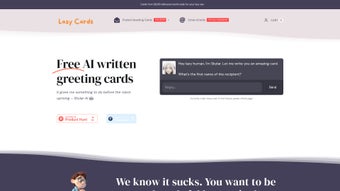
We Write Cards is a cloud‑native AI text generator that produces occasion‑specific messages in under 30 seconds. Users select an event type, supply a few personal details, and the engine returns a ready‑to‑copy draft that feels genuinely authored. The service is divided into three tiers: a free Basic tier offering unlimited single‑draft generation, a $0.99 Premium tier unlocking multiple writing styles, up to three revision drafts per request, and a custom Business plan for bulk corporate usage. Payments are processed securely via Stripe, and all data transmission is encrypted using HTTPS. Because the platform runs entirely in the browser, updates to the AI model are applied automatically—no manual patches or version checks are required.
- AI‑Powered Text Generation: Leverages state‑of‑the‑art language models to produce context‑aware, natural‑sounding messages.
- Three Service Packages: Free Basic, $0.99 Premium, and tailor‑made Business plans.
- Multiple Writing Styles (Premium): Formal, casual, humorous, poetic, and more.
- Instant Revisions: Up to three alternative drafts per request (Premium only).
- Extensive Occasion Library: Templates for birthdays, weddings, anniversaries, graduations, condolences, and countless other events.
- Secure Stripe Payments: Fast, encrypted transactions with receipt email confirmation.
- User‑Friendly Dashboard: Real‑time preview, copy‑to‑clipboard button, and easy navigation.
- Responsive Design: Optimized for desktop, tablet, and mobile browsers.
- External Printing Partnerships: One‑click export to partner services for physical cards (optional).
- In‑App Help Center & Example Gallery: FAQs, tutorial videos, and sample messages for inspiration.
Pros
- Generates high‑quality messages in seconds, dramatically reducing writer’s block.
- Free Basic tier offers genuine value without any subscription lock‑in.
- Premium upgrade at $0.99 provides multiple tones and revision options—a strong cost‑benefit ratio.
- Secure payment handling via Stripe protects user financial data.
- Fully responsive web app works on any modern browser, eliminating OS‑specific issues.
- No software download; automatic updates keep the AI model current.
- Rich occasion library accelerates the creation process for common events.
- Option to integrate with third‑party printing services for tangible cards.
Cons
- No built‑in printing or direct mailing; users must rely on external providers.
- Lacks visual design tools—focuses solely on text generation.
- Premium revisions limited to three per request.
- Business plan pricing is custom and requires a quote, which can delay onboarding.
- Requires an active internet connection; offline usage is not supported.
Installation & Compatibility (itemprop="operatingSystem")
Because We Write Cards is entirely web‑based, there is no traditional installation. All you need is a modern browser (Chrome, Firefox, Safari, Edge) with HTML5 and JavaScript enabled, and an internet connection. The platform is compatible with Windows 10/11, macOS Ventura and later, popular Linux distributions, Android 8.0+, and iOS 13+. Users simply navigate to wewritecards.com, optionally create an account to save drafts, select a package, choose an occasion, input personal details, and click “Create Message.” The AI returns a draft instantly, which can be copied to the clipboard or exported to a partner printing service. Since everything runs in the browser, updates to the AI engine are applied server‑side—users always access the latest model without manual patches.
Frequently Asked Questions
How quickly does the AI generate a message?
The engine typically delivers a personalized draft in under 30 seconds. Premium users often experience marginally faster response times due to priority processing.
Is there any usage limit on the free Basic plan?
The Basic plan allows unlimited single‑draft generation. However, it does not include style variations or the three‑revision option available to Premium subscribers.
Can I access We Write Cards on my smartphone?
Yes. The responsive design works flawlessly on Android and iOS browsers, delivering the same functionality as the desktop version.
What payment methods are accepted for the Premium upgrade?
Payments are processed through Stripe, which accepts major credit cards (Visa, MasterCard, American Express) as well as Apple Pay and Google Pay where supported.
Does the service store the messages I create?
If you create an account, your messages are saved securely in a private library for future reference. Anonymous sessions are not retained after the browser window is closed.
Conclusion & Call to Action
We Write Cards delivers on its promise of fast, AI‑driven, personalized messaging. The free tier provides a risk‑free entry point, while the $0.99 Premium upgrade adds the flexibility many users need for tone and revision control. Its browser‑only architecture means zero download hassle, instant updates, and broad compatibility across all major operating systems. Although the lack of built‑in printing might be a drawback for some, the seamless handoff to third‑party printing partners keeps the workflow smooth for those who still want a physical card. Overall, the tool strikes an impressive balance between convenience, cost, and quality—making it an excellent choice for anyone who values heartfelt communication without the time‑consuming effort of writing from scratch.
Ready to transform your message‑making process? Download We Write Cards now, pick the plan that fits your needs, and start sending AI‑crafted notes that truly resonate in seconds.
We Write Cards impresses with its speed, ease of use, and surprisingly nuanced AI output. The free tier is generous, and the $0.99 Premium upgrade feels like a steal for the added flexibility. While the lack of built‑in printing may be a minor inconvenience, the overall experience is polished and reliable, making it a top choice for anyone who wants to send a thoughtful note without the hassle of writing it from scratch.



.png)



